
Welcome to my blog! Read about photography, film photography in 35mm, medium, and large formats, pinhole photography, about darkroom printing, alternative photographic processes, and more. Thank you for visiting!
Fall Crept Up on Us Early This Year in Western New York, Emery County Park

 It feels that way to me and I've heard it from others. But whether it is true or not I am not sure. However, with September ending today, there are areas full of color as I'd normally associate with the first or even second week of October.
In this sequence of photos from the Emery County Park, it shows how much it matters in which direction one looks. Not only are there both coniferous and deciduous trees there but the leaves are changing colors in pockets. This is actually my favorite time when the bright yellows, oranges, and reds contrast strongly against the still prevalent green. It just all looks more crispy.
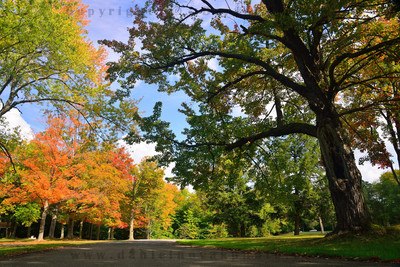 Just look at this next photo. The only difference is that I laid down on the road and turned 180 degrees. All of a sudden, the summer alley is transformed into a beautiful fall scene full of bright colors.
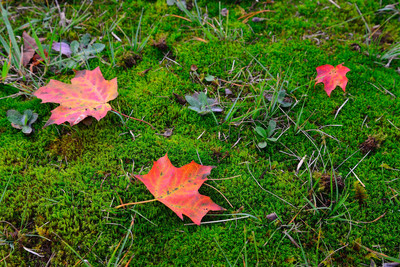
I tried to soak the place in, photographing both wide views and close ups, including signs of humans or trying to leave them out, from higher vantage points or down on the ground. Talking about ground, this is the time of the year when beautiful green moss can look even better! Whether it is in a park under some trees like here or by a creek, the deep green hues just work so nicely being surrounded by the foliage bursting with color.
Emery Park is in the village of South Wales, NY and offers hiking, biking, picnic shelters, baseball, cross-country skiing, showshoeing, and also downhill skiing with a T-Bar to get you back up. You can also hike along the East Branch of Cazenovia Creek in its Easternmost section. And finally, it also has a disc golf course.
For the waterfall hunters, it features several small waterfalls (that I am yet to see and photograph! That has to be corrected as soon as possible!). You can find info on those on Fullzguy's Western New York Waterfalls page.
Emery Park is a short drive south from East Aurora and not far from Buffalo and its suburbs.
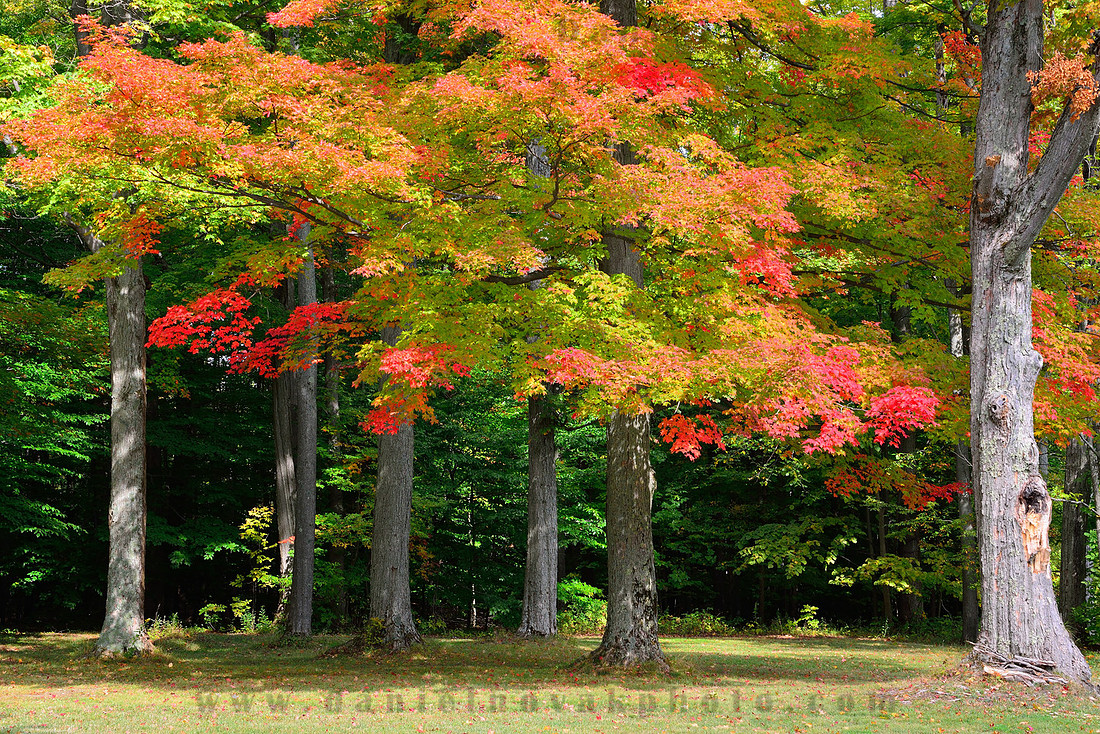 Fall offers two beautiful landscape ingredients: colors and morning fog. Have fun chasing them!
Why mess with the settings? - Shutter speed
 Maybe it looks like a silly topic but I do get asked once in a while why one should mess with the camera settings. The manufacturers make them so advanced and so smart that the Auto option should just take care of it all, right? And while I can talk about it I usually don't have anything to show it on.
So here, I remembered to shoot an example of how a shutter speed setting can make quite a dramatic difference. In the first photo, you're looking at an exposure of 1/250 sec, in the second 1/30 sec. I know, pretty obvious, but the goal was to put them side by side.
And too bad I did not shoot another example with a faster shutter speed over 1/1000 sec. In my opinion flowing water, and especially waterfalls, do not look that good when shot on auto.

And I do not want to imply that the only way to shoot waterfalls is on a tripod with a very slow shutter speed. It's just that I like them either somewhat blurred with a slower shutter speed or razor sharp with a very fast shutter speed. There does not seem to be a happy medium for me.
On the slow side, experimenting with what works based on the given water speed is a good idea. Sometimes, shutter speed of 15 - 30 seconds turning all into milk looks good, other times 1 or 2 seconds leave just enough texture in the blurred water to make it look even better.
Have fun messing with the setting!
Photo Backup
[Edited on December 27, 2016: note on TrueCrypt deprecation and alternatives]
This one is important. I know, you probably hear it everywhere, read it everywhere, but do you do it? I know I have been preaching about backup to my friends and family for years but for some reason they rarely listen until they become a data loss victims themselves. Years back, cost may have played a larger role. Large capacity drives were expensive. Despite the growth of individual file sizes the development in the storage area has continued and choices are plentiful today to make sure you never lose a photo (or any file for that matter) again. Yes, it still costs money that you don't have to spend to get by but again, that approach will only work until something bad happens. And then it is too late. It's like insurance. You hope you will never have to use your backup but it should be there just in case. Storage is relatively cheap. Photographs are priceless. Really, what price can you put on losing the photos of your kids growing up? The photos of your vacations in the past year, 5 years, or 10 years? The photos documenting your various projects? Photos are frozen moments from the past. Most of them can't be replaced at any cost.
Don't worry, I will not bore you with pages and pages of equipment that is available. I will just share the concept behind my backup strategy and mention the products I use but feel free to do some additional checking on the Internet and at various online stores to see what equipment specifically fits your needs.
From my observation reading other web sites and some photo magazines most places recommend the external USB / fire wire drives. My recommendation will be a little beyond that. While I agree that the small external drives make for great back up devices on the road, that is if you bother lugging your laptops around, home backup can be more sophisticated, more automated, and not really too much more expensive.
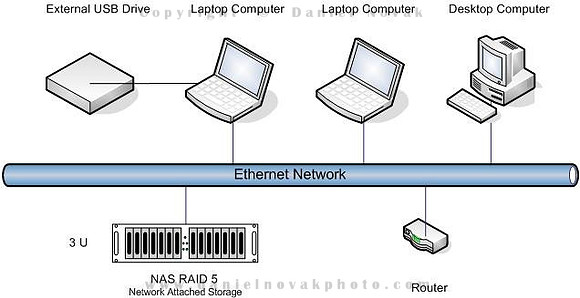
As you can see from the schematics above the core of my onsite backup is a network attached storage (NAS) device configured as a RAID 5 array. Why network vs. the direct attached USB? I use multiple computers at home. Using a NAS device allows for easy data sharing across the multiple compueters and it also allows for a backup of them all to a central place without constant dealing with wires. Further, it allows for either real-time or close to real-time backup of your files on all the computers without relying on manual backup execution. This last point is a big one too. Frequently people will be set up to do back up but simply forget. Automating it allows for a set it and forget it approach - well, almost. It still pays not to really forget about it but validate your backups once in a while to be sure you're not in a false sense of security. Can the files be really retrieved from your back ups? Are the back ups complete?
Why RAID 5? I believe it provides solid back up while providing a good value. In a RAID 1 configuration two disks are required and one is a mirror replica of the other. Thus the cost of RAID 1 is more than double of a single drive back up. However, in RAID 5 configuration, data is distributed across more than 3 disks with the goal to provide enough redundancy to cover a single drive failure.
Let's look at a sample 4-disk 1TB RAID 5 system. In order to provide replication to support a single drive failure 25% of the total storage has to be reserved. As such, 250GB is lost and reserved for replication and 750GB available for actual data. When a single drive in the array fails all data is still available. However, prompt disk replacement is necessary to guard against a second drive failure since that would result in a catastrophic and complete data loss (if used for backup only, the data would still be on the primary drives being backed up). Also, in the crippled state, performance is impacted.
I used to use now discontinued version of Buffalo TeraStation with 1 TB capacity. I have recently replaced that with a 10TB NAS device from Synology, their 5-Bay DS1512+ model. The upgrade was triggered mostly by the TeraStation failing. Despite not being too excited about having to pay for a replacement I decided not to revive it and instead replace it. Since I switched to a Mac in the meantime, compatibility with that platform was important and unfortunately, Buffalo Technology decided the device was too old to update its firmware to support OSX Lion. I had to put hacks in place to get it working as a network device but Time Machine did not like it any more. Using Synk was my temporary solution until now. Now that I opened the topic, let me say right here that the set up was a breeze and I can use this system from both Windows and a Mac with no issues and Time Machine also found the device and happily used it for its backup target.
You can see the current Buffalo technology models here (or here on Amazon) but I cannot comment on those since I no longer use the brand. Of course, many other NAS RAID devices are available. Just search your favorite online store for something like NAS RAID.
If you agree that an always on backup is the right thing but the cost of a RAID-based system is prohibitive, don't skip it all together. A single drive NAS is better than nothing. For a Mac, you can just play it safe and stick with Apple and get their Time Capsule. For Windows, you might want to check out a router that has a USB port and can turn any USB drive into a NAS drive. You may even have that available already without knowing!
Now for making the backup happen what software do I use on Windows? I tried many applications that provide both real-time back up and close to real-time batch based back up approaches. Reliability played the most important factor in my decision to settle on Vice Versa Pro. While it does not provide real-time replication you can get as close to it as needed. In a Nutshell, you configure one or multiple back up plans and have them execute with your specified frequency. The load it puts on the system is very small and can easily run in the background. It is a two staged execution where in the first stage the software compares your source and destination folders and in the second stage it actually performs the replication.
For file deletion, I recommend using the archiving approach. That means files deleted at the source (your laptop / desktop) are not immediately deleted from the backup destination but rather moved to an archive area protecting you against accidental file deletion. You can set whether to keep your archived data forever or for a predefined amount of time after which the files are permanently deleted.
I also suggest using the versioning setting. I have mine set to 3 but you can set a number based on your needs and storage capacity. This protects you from accidentally overwriting data. Even if you accidentally store your modified file over the original you can go the specified number of versions back and recover what would have been lost.
For a Mac, as long as you have a compatible device like the DS1512+, I'd stick with Time Machine. While it does not let you mess with its configuration much it does all of the above automatically. And that is the point in not offering the settings. It's meant to work right. While I was in the temporary situation when Time Machine was not an option for me I tried out quite a few alternatives and was rather disappointed with them all. Synk stood out as one I was happy with - simple and reliable. However, it suffers from some problems with OSX Lion and once in a while a manual intervention is needed. They aslso seem to have some issues with their development team since this known incompatibility has remained un-addressed for a long time.
And what's the USB drive there for? It's for off site back up. I know, I can already hear you saying I am insane and paranoid, but why not? This additional 1 TB drive cost me less than $100 and provides the added peace of mind. I store that drive away from the house and once in a while (monthly or so) bring it home and execute my off site back up plan that moves all of the data on the primary back up RAID NAS to this secondary drive. Then it leaves the house again. I believe it is a huge benefit for small money. Your house does not have to be destroyed by a disaster. All it takes is a thief who snags your laptop and the NAS back up device. Photos of your lifetime gone!
You could further improve on this system by having two offsite drives and only refresh one at a time so that your data is never in a single place at the same time. Some of the new NAS devices actually can be configured to back themselves up when an external drive is attached. That way, it is really simple and even computer free.
That was for the data safety. How about its security? What if it gets stolen? Vice Versa Pro and most of the other back up tools offer encryption. Use it. The performance impact is small and you can rest easily knowing that if your back up device gets stolen the thiefs will benefit from using it but will not be able to get your data. Of course, data protection of your laptop / desktop also needs to be considered but that is a topic for another day.
For the off site USB drive I do not use the encryption capabilities of Vice Versa Pro but rather a full volume encryption using the free open-source TrueCrypt software [12/22/16: Note that TrueCrypt development ended in May 2014. On their page, BitLocker is recommended as a replacement, however, is a Windows only solution. This Comparitech page offers other TrueCrypt alternatives. I have not tried any of these solutions.]. That allows me to access the files on the drive while working offsite on a computer that does not have the Vice Versa Pro installed (yes, it needs TrueCrypt installed).
And that's it! If you currently have no back up the above may sound complicated but it really is not and once it is set up all it takes is an occassional validation. I look in the back up folders to confirm all of my recent work is there and try to recover a few random files. Again, if you have no back up at all, a single external USB drive is a great start! Moving to a replicated drive or a couple non-replicated would be the next step up. I believe the above configuration provides enough protection for my peace of mind at a reasonable cost. Maybe you need more, maybe you need less, your call. But please, set up your back up strategy today. Once you lose pictures or any other data it is too late.
You're all backed up, have a peace of mind, time to have fun!
Where the River Rages - Niagara River Gorge
 Without a doubt, this is one of my most favorite local spots to go hiking, to enjoy the outdoors, and to photograph. Just a few miles from the spectacle of Niagara Falls many might wonder why I'd pick this place over a place that millions from around the world visit each year.
The last point is part of the reason. The Niagara River gorge does not welcome people by the busload but rather by individuals, families, or very small groups. Even if buses visit the upper parking lot just the more physically fit make it down the many aging stairs, to Whirlpool, and past it to the beautiful class 6 rapids.
It is also more up close and personal. You can be right by the water sitting on the rocks and just stare into the water from a few feet away and listen to its roar that pretty much makes all other sounds disappear.
I love to watch the force of water here. he constant inflow of huge amounts of water carve out seemingly impossible water formations. All of a sudden a mountain starts growing out of nowhere and the incoming water pushes it higher, and higher, until it all crashes down. And the crash is always different. Sometimes, it tips over like an ocean wave, other times, it appears to explode and water splashes to all sides.
 Look at a large area or focus your eyes on a small spot. In either case it is a magnificent natural show. I would not want to be one of the rocks that get in the way of the water here.
Sit down, tune out, enjoy!
The Moon, The Full Moon, The Harvest Moon, The Blue Moon, ... The Moon
The Moon constantly begs for out attention. Yes, it has been a while since humans actually visited that celestial body, but now we at least gaze at it from Earth. A lunar eclipse sure begs for attention, as does solar eclipse. Moonrise and moonset correspond to sunrise and sunset. But there just appears to be so much more to the Earth's satellite. Farmer's almanac gives each full moon a special name.
 Two full moons in a single month are the simpler definition of a blue moon. There's also another one that defines a blue moon as the third full moon in a season with four full moons. I will stick with the simpler one :-)
Every 19 years two blue moons happen in a single year. When that happens, it is almost always in January and March thanks to the short month of February in between.
Have fun gazing up!